How to Book KTX Tickets as a Foreigner (2026 Guide)

The short answer: for most visitors, start with the official KORAIL English reservation page. It does not require a Korean phone-based membership, it sells ordinary KTX tickets up to one month ahead, and it supports overseas cards that can complete 3-D Secure authentication. Use the official KORAIL Talk app if you prefer a mobile ticket. Before paying, check the exact station name, save the e-mail and booking password exactly as entered, and make sure the final ticket—not only a card authorization—appears in MY TICKET.
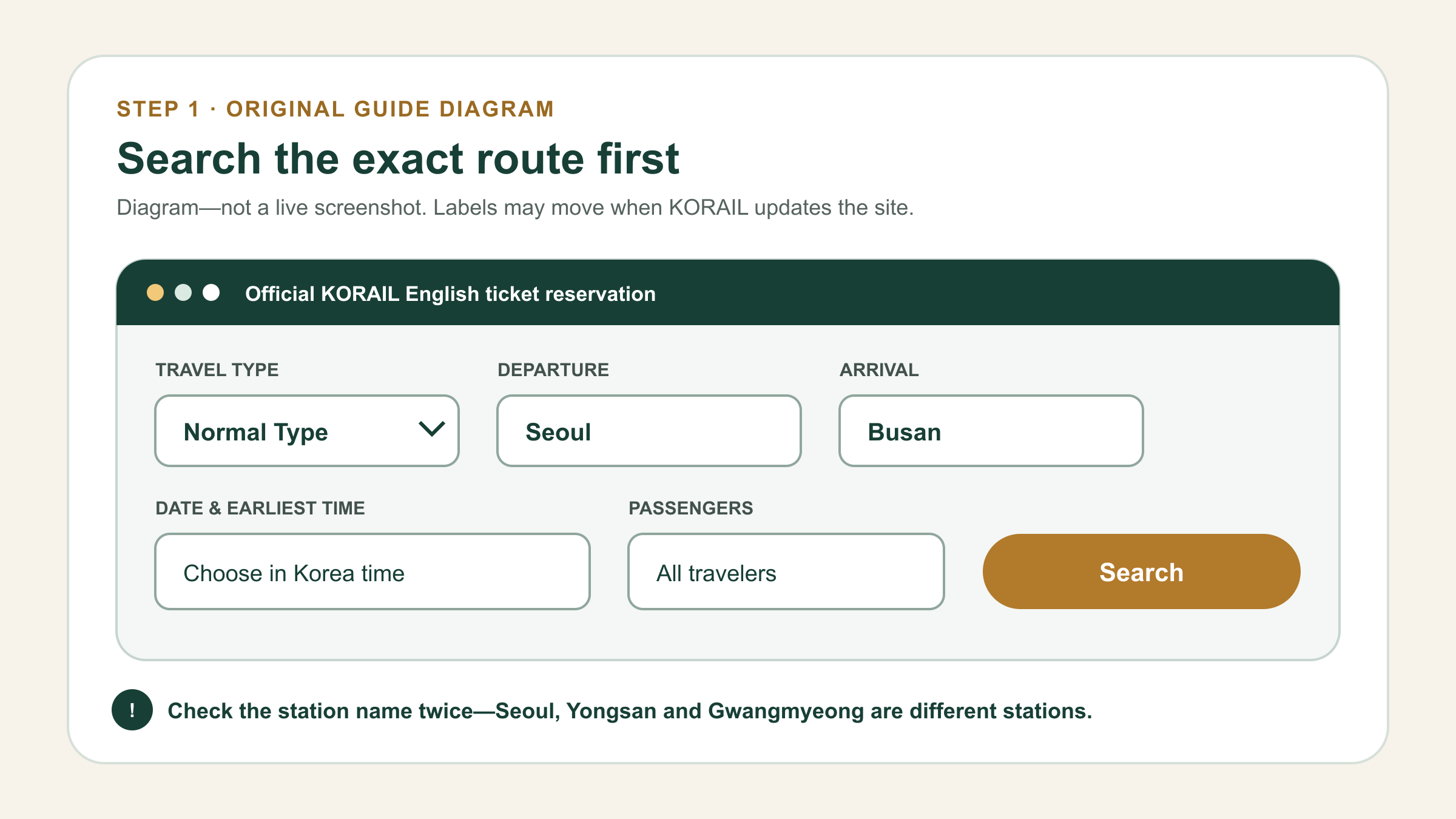
KTX search form steps

Checked July 21, 2026

KORAIL reported 6.06 million foreign rail passengers in 2025. Its earlier 2024 release said foreign rail use rose 61% to about 5.54 million and tickets issued through the multilingual website rose from 870,000 in 2023 to 1.07 million in 2024. Those figures show a real rise in foreign rail use and multilingual booking, but they are not a KTX-only reservation count. Booking screens, card brands and holiday sales rules can change, so recheck the official page before payment.

Why these are diagrams, not copied KORAIL screenshots: KORAIL’s copyright page labels its published material under Korea Open Government License Type 4, which bars commercial use and modification. Because this site may carry advertising, the four visuals below are original guide diagrams. They preserve the verified sequence without republishing the official interface. Open the linked KORAIL page beside this guide for the live screen.

Choose the website, app or station in 60 seconds

Method Best for Foreign-card point Ticket to show
KORAIL English website Booking before arrival, desktop users and travelers without a Korean account Overseas card must pass the issuer’s 3-D Secure check The issued Home Ticket opened from MY TICKET or a valid printout
KORAIL Talk app Travelers who want the ticket, changes and trip management on one phone Card and authentication behavior can vary by app version and issuer The live mobile ticket inside KORAIL Talk
New station machine or counter A practical fallback after online payment fails KORAIL says new overseas-card machines were installed at 148 stations; older machines can differ The ticket issued at the station
Current KTO-listed OTA A last online fallback when the official checkout cannot authenticate your card Check total price, exchange rate, ticket delivery and refund rules before paying The valid ticket specified by that seller

Recommended order: official website first, official app second, a supported station machine or staffed counter third. The Korea Tourism Organization’s May 2026 visitor-payment guide also lists Klook as a KTX booking option that accepts foreign-issued cards. An OTA may have different fees and refund support, so it is a backup—not a reason to skip the official price check.

Before you book: prepare six things

  • Your exact route: copy both station names in English and Korean. “Seoul” can mean Seoul Station, Yongsan or a station outside the center such as Gwangmyeong.
  • Korea date and time: the one-month sales window opens at 07:00 Korea time. Your home time zone does not move that opening time.
  • Every passenger: set the correct adult and child count before searching. Do not expect to add a sold-out seat after payment.
  • A reachable e-mail address: use one you can open during the trip. Treat uppercase and lowercase letters as significant where the site tells you to.
  • A booking password you will retain: KORAIL warns that the e-mail and password must be entered correctly to retrieve a ticket.
  • A 3-D Secure overseas card plus one backup: enable online and overseas purchases with the issuing bank before the booking opens.

How to book KTX on the official English website

Step 1: open the real KORAIL site and search

  1. Open korail.com/global/eng/ticket/reservation. Check the domain carefully; search ads and resellers can appear above the official result.
  2. Set Travel Type to Normal Type for an ordinary KTX journey. Tourist-train choices are different products.
  3. Enter the exact departure and arrival station. Use the station picker instead of trusting autocomplete if similarly named stations appear.
  4. Select the departure date and the earliest time you are willing to travel. The results begin from that time rather than showing only one train.
  5. Set the passenger count, then select Search.

Do not guess the Seoul terminal: Seoul Station (서울역), Yongsan Station (용산역) and Gwangmyeong Station (광명역) are separate places. Historical “Gyeongbu from Seoul, Honam from Yongsan” advice is only a shortcut; trains on the same corridor can use different Seoul-area terminals. The station printed on your selected train is the answer.

Step 2: compare the result and choose a seat
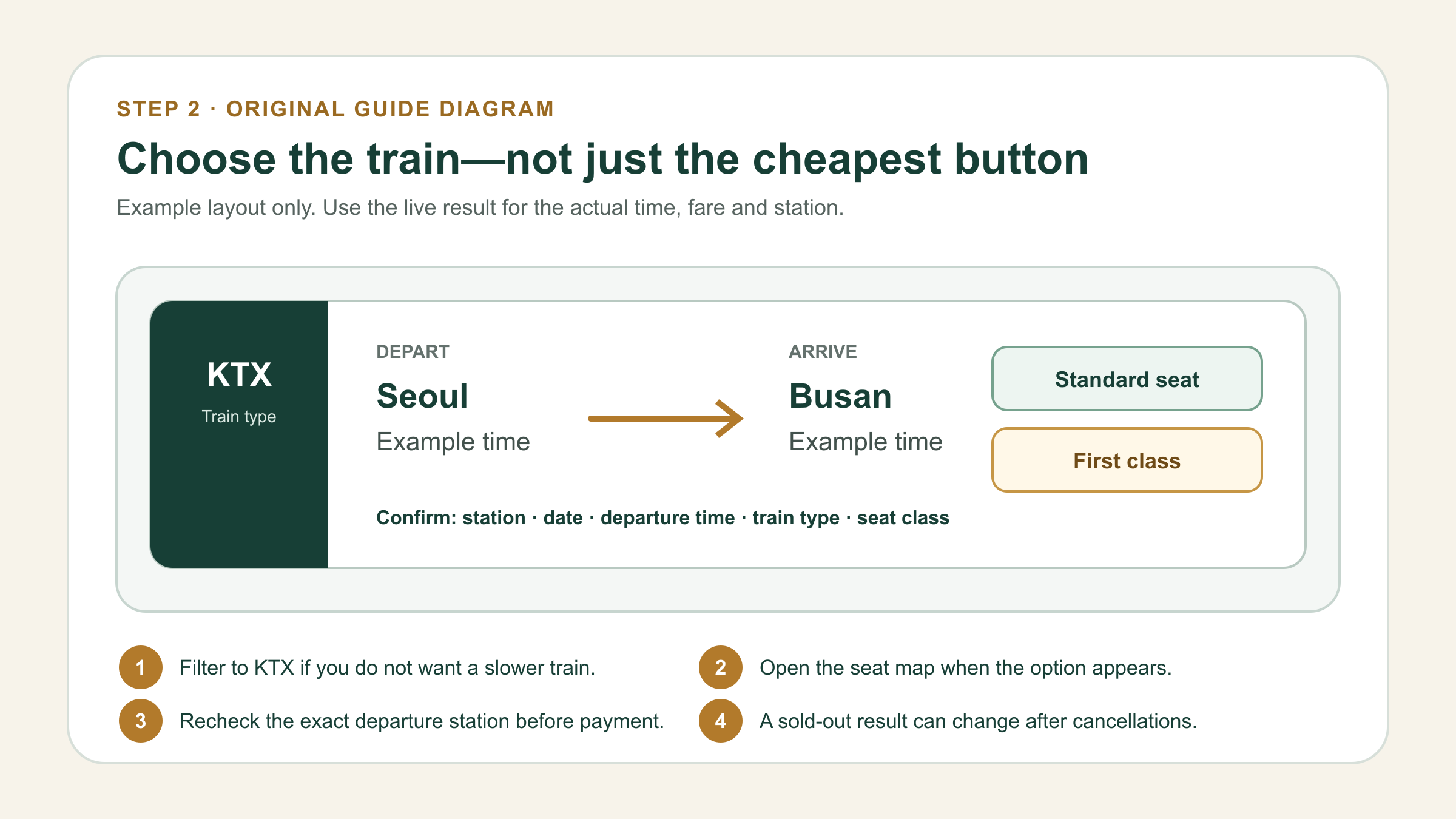
KTX train and seat selection

Use the KTX filter if you do not want a conventional train. Then compare five fields before pressing any reservation button:

  1. Departure station: this is where you must physically board.
  2. Departure date and time: watch for a search that has rolled into the next day.
  3. Train type: KTX, KTX-Sancheon, KTX-Eum and KTX-Cheongryong can have different layouts and routes.
  4. Arrival station: a city can have more than one rail terminal.
  5. Seat class and availability: Standard and First Class are different fares. A seat-map option may appear for eligible trains.

If your preferred train is sold out, search an earlier or later time and recheck periodically; cancelled seats can return. Do not buy a ticket from a different station until you have compared the transfer time from your hotel. Saving ten minutes on the train is not useful if the alternate terminal adds an hour on local transport.

Step 3: enter passenger and ticket-retrieval details

The foreign-language normal-ticket flow is designed for visitors and does not require you to invent a Korean phone number or domestic membership. Enter the passenger information shown on the current screen, then create the e-mail and numeric booking password requested for later lookup. Use information you can reproduce exactly.

  • Do not use a temporary e-mail account that may disappear before the journey.
  • Do not let a password manager silently replace the booking password when you return to MY TICKET.
  • Record the e-mail, password, travel date, route and payment card in your secure trip notes. Do not put the full card number in a shared itinerary.
  • When a named fare or pass requires passport identity, enter the name exactly as the official product instructs.

Step 4: pay with an overseas card and complete 3-D Secure
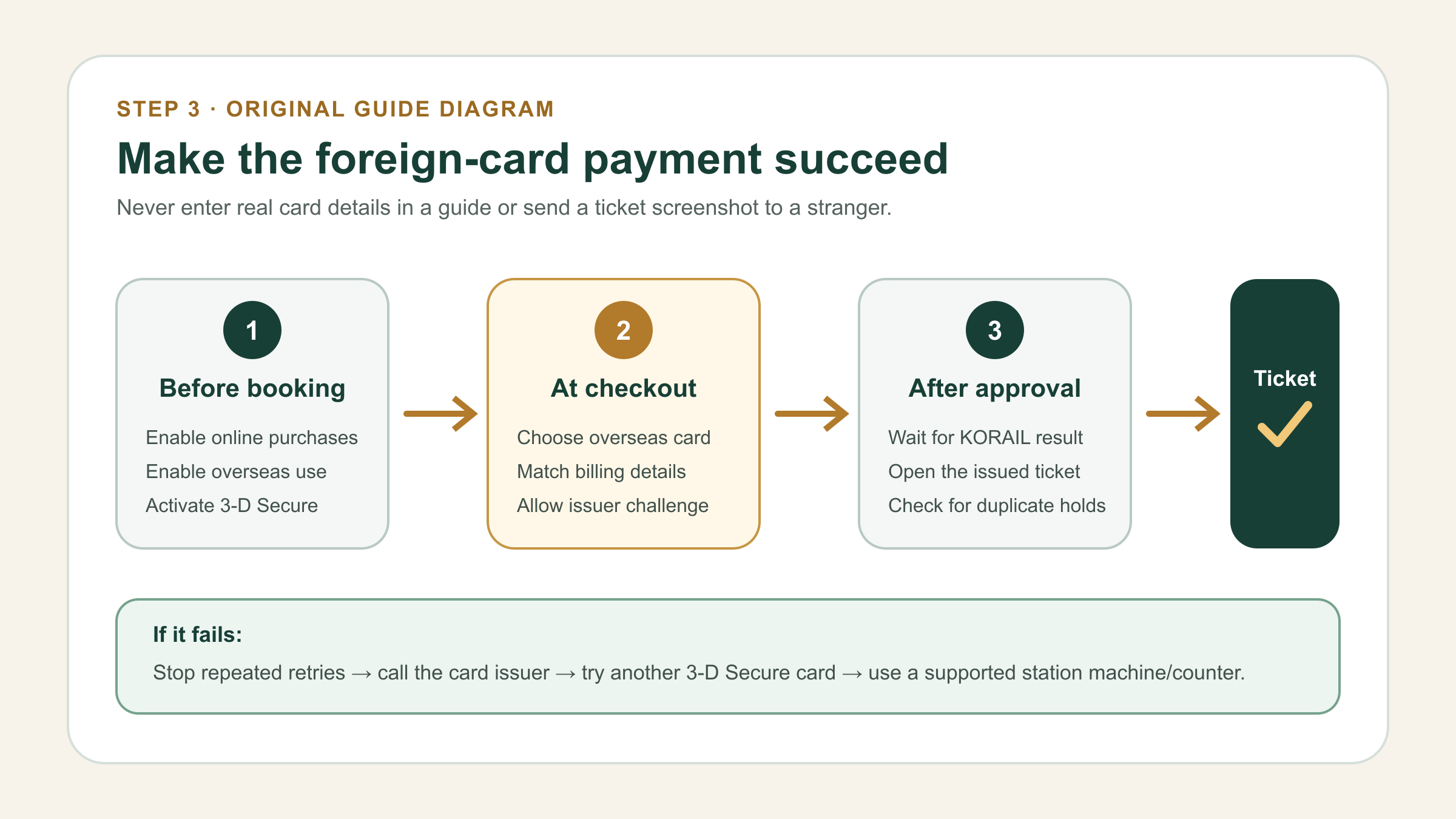
KTX foreign card payment flow

KORAIL’s March 4, 2025 overseas-card notice says that only overseas-issued cards enrolled for an online 3-D Secure password can be used. Current checkout options include overseas Visa, Mastercard and JCB categories, but a displayed logo is not an approval guarantee. Your issuer still decides whether the transaction passes.

  1. Select the overseas-card option that matches your card network.
  2. Enter the billing information on the secure payment page. Never send these details to a blog, hotel or social-media helper.
  3. Complete the bank’s 3-D Secure challenge in its app, text message or password page.
  4. Return to KORAIL and wait for the final issue result. Do not close the page at the bank-approval screen.
  5. Open the issued ticket immediately. A card authorization or confirmation e-mail alone is not enough.

Step 5: retrieve the actual ticket
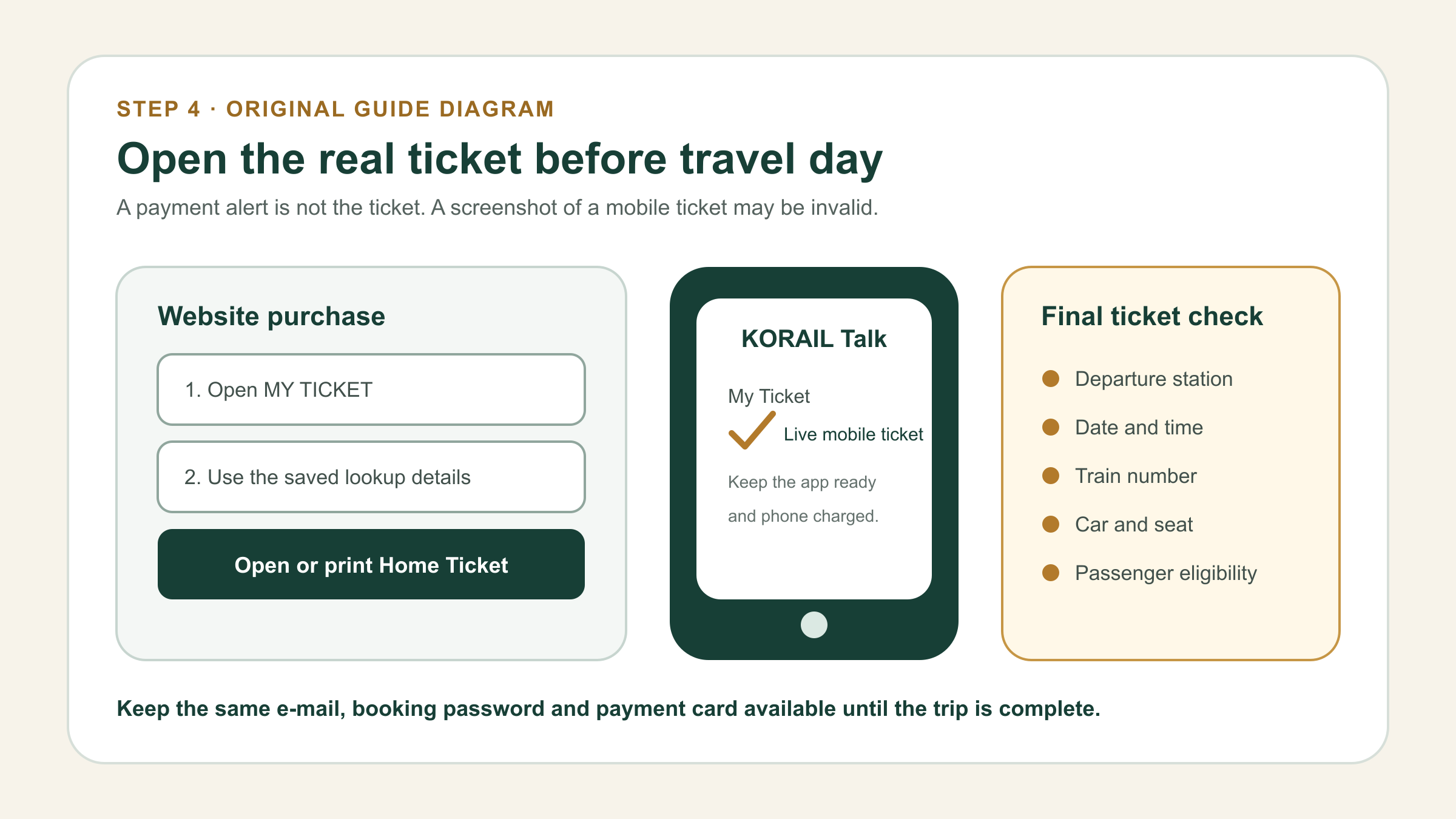
KTX ticket retrieval checklist

For a website purchase, open MY TICKET and enter the same lookup details used during purchase. The page can request the e-mail, booking password and card information associated with the transaction. Open the issued Home Ticket and follow the current print or display instruction.

Check the departure station, date, time, train number, car and seat before closing the page. If MY TICKET shows no issued ticket, do not assume that a pending card entry means the reservation exists. Check for a duplicate authorization, contact the issuing bank if needed, and use KORAIL’s English customer service rather than repeatedly paying.

How to use the KORAIL Talk app as a foreign visitor

Download only the app published by 한국철도공사 (Korea Railroad Corporation): KORAIL Talk on Google Play or KORAIL Talk on Apple’s App Store. KORAIL says the service supports seven languages: English, Simplified Chinese, Traditional Chinese, Japanese, Vietnamese, Thai and Indonesian.

  1. Open the menu and change the language before starting a reservation.
  2. Choose the guest or foreign-language booking flow rather than forcing a Korean membership registration.
  3. Search the exact stations, date and passenger count.
  4. Select the train, class and seat when the current version offers a seat map.
  5. Enter the requested traveler and overseas-card details, then complete the issuer’s authentication.
  6. Open My Ticket in the app and confirm the live mobile ticket is present.

The app is useful after purchase because the ticket stays with the trip. KORAIL also introduced an in-app ticket-change function. As verified in July 2026, an eligible ordinary ticket can be changed without a penalty when the request is made at least 30 minutes before the original departure, the route is unchanged, the replacement train is within seven days before or after the original travel date, and a seat is available. Product restrictions and the number of allowed changes can differ, so read the condition shown in the app before confirming.

Do not board with only a screenshot of an app ticket. KORAIL’s current guidance treats copied or captured mobile tickets as invalid because the live ticket contains security features. Keep the phone charged and open the actual ticket in KORAIL Talk. Website buyers should use the issued Home Ticket as instructed.

Foreign-card payment troubleshooting, in the right order

The 3-D Secure window never appears

Confirm that pop-ups or redirects needed for the bank challenge were not blocked, then check the card issuer’s app. The bank—not KORAIL—controls enrollment and approval. Ask the issuer whether online overseas transactions and 3-D Secure are active for that specific card.

The bank approved the charge, but KORAIL shows no ticket

Do not immediately submit the payment again. First search MY TICKET with the exact original e-mail and password, check for a KORAIL confirmation, and look at the card entry to see whether it is pending or completed. A pending authorization can disappear without becoming a ticket, but the timing is controlled by the issuer. If the first attempt is unclear, contact KORAIL and the card issuer before creating a duplicate booking.

One card fails repeatedly

Stop after a small number of attempts; repeated submissions can trigger fraud controls. Try a different 3-D Secure-enabled card from another issuer or network. Use the same traveler details and make sure the billing country and authentication phone/app are available.

Online payment still does not work

Use a supported station machine or staffed rail counter. KORAIL reported that 310 new machines capable of overseas-card payment were introduced at 148 stations for 2025. Availability still depends on the machine in front of you. Seoul Station also operates a foreigner travel center on the second floor; the published hours were 09:00–18:00 daily when checked, but confirm them before making a special trip.

You must book before arriving in Korea

After exhausting the official website and app, compare a KTO-listed KTX seller. Verify the exact operator, station, train, seat delivery method, total price and cancellation channel. A reseller’s flexible payment flow does not make its after-sales rules identical to KORAIL’s.

Eight booking tips that prevent expensive mistakes

A rail pass or early ticket is useful only after the route is worth taking. If your cities are still undecided, compare the best first-trip destinations and realistic stay lengths before locking in nonrefundable train segments.

  1. Book popular Friday, Sunday and holiday trains when sales open. Ordinary tickets generally open at 07:00 Korea time one month before departure. Seollal and Chuseok use separate advance-reservation schedules.
  2. Do not book a tight connection after an international flight. Immigration, baggage and airport transport can vary widely. A flexible later train is safer than a nonrecoverable chain of assumptions.
  3. Search nearby times before changing stations. A later train from the correct terminal can be faster overall than crossing Seoul with luggage.
  4. Use the seat map when offered. Keep a group together before payment; adjacent seats can disappear while you restart the transaction.
  5. Compare an ordinary ticket with KORAIL PASS. A pass can help on a dense multi-city itinerary, but one Seoul–Busan round trip does not automatically make it cheaper. KORAIL PASS also does not cover every operator or train, including SRT.
  6. Keep the card used for purchase. It may be requested for ticket lookup or support even after the charge has posted.
  7. Arrive 20–30 minutes early at an unfamiliar station. Large terminals have separate subway, concourse and platform levels, and the platform can be announced close to departure.
  8. Read the Korean station name aloud or show it to a driver. The English names Gwangju and Gwangju-Songjeong are easy to collapse in conversation; 광주역 and 광주송정역 are unmistakably different.

Stations foreign visitors most often confuse

What you may search What to check Main warning
Seoul 서울역 or 용산역 Both can appear on long-distance routes; use the station printed on the train result.
Gyeongju 경주역 This KTX station was called Singyeongju until December 2023; the former downtown Gyeongju Station is closed.
Gwangju 광주송정역 KTX uses Gwangju-Songjeong, not Gwangju Station.
Cheongju 오송역 Osong is the KTX hub in Cheongju, but it is not in the downtown core.
Busan 부산역, 구포역 or 부전역 They are three different terminals serving different routes and parts of the city.
Incheon Airport AREX transfer The Airport Railroad Express is not KTX; there is no current direct KTX from T1 or T2.

Use the full companion guide before a multi-city trip: KTX Station Name Traps: Seoul, Gyeongju, Busan & More. Once the ticket flow is clear, open the complete Incheon or Seoul to Busan transfer or the Gyeongju KTX and historic-center transfer.

Changing or cancelling a ticket

Before the departure time shown on the ticket, a website Home Ticket can be refunded on the website and a mobile ticket can be refunded in KORAIL Talk. After departure, KORAIL generally requires a station counter; the app has a narrow KTX exception within ten minutes when it can confirm that the passenger is not on the train. Penalties depend on day and timing, and the latest table takes priority.

If you bought through a reseller, cancel through that seller unless its terms explicitly transfer support to KORAIL. A foreign-card refund can take additional business days to appear, depending on the issuer. For an ordinary web ticket when you cannot find a direct change function, the conservative path is to confirm a replacement seat, then follow KORAIL’s current refund/rebook instructions or ask the customer center.

Boarding-day checklist

  • Open the actual ticket before leaving hotel Wi-Fi and confirm you can retrieve it again.
  • Check the station in both English and Korean, then open the exact map pin.
  • Confirm date, departure time, train number, car and seat.
  • Keep your phone charged; carry the valid Home Ticket if you booked on the web.
  • Carry a passport or eligibility document when using a named discount, KORAIL PASS or other product that requires identity verification.
  • Watch the station board for the live platform. Operational information on the station display overrides an old blog screenshot.

Frequently asked questions

What is the official KTX booking website for foreigners?

Use KORAIL’s English reservation page at korail.com/global/eng/ticket/reservation. Check the domain before entering payment details.

Can I book KTX without a Korean phone number?

Yes. The foreign-language website’s ordinary-ticket flow uses booking lookup details such as e-mail and password rather than requiring a Korean phone-based membership. Enter only the information the current official page requests.

Which foreign cards work on KORAIL?

The current overseas-card menu includes Visa, Mastercard and JCB categories, and KORAIL requires a card enrolled in 3-D Secure. A supported network logo does not guarantee approval by every issuing bank.

When can I buy a KTX ticket?

KORAIL’s standard rule is from 07:00 Korea time one month before departure. The website normally sells until 20 minutes before departure. Holiday special-sale schedules can replace the ordinary opening.

Is AREX the same as KTX?

No. AREX is the Airport Railroad between Incheon Airport and Seoul. Use AREX or another airport transfer, then board KTX at the station printed on your KTX ticket.

Can I show a screenshot of my KORAIL Talk ticket?

Do not rely on one. Open the live mobile ticket in the official app because copied or captured tickets can be treated as invalid. Website buyers should use the issued Home Ticket as instructed.

What should I do if the charge appears but no ticket appears?

Search MY TICKET with the exact original details, check whether the card entry is pending, and contact KORAIL and the issuer before paying again. A card authorization by itself is not a train ticket.

Official sources

Update history: first fully verified edition prepared July 21, 2026. The article uses original diagrams rather than official interface screenshots because KORAIL’s published content is marked for noncommercial, no-derivatives use. Live KORAIL screens, station boards and current conditions take priority.

Scroll to Top