The short answer: start with CATCHTABLE Global. Korea Tourism Organization says its global service can make real-time reservations and join supported waitlists with an email and international credit card, without a Korean phone number or local payment method. If the restaurant is not listed, use the venue’s official contact, ask your hotel whether it offers calling help, or plan an early walk-in.
Checked July 21, 2026
Korea Tourism Organization currently describes CATCHTABLE Global as a nationwide service available in 20 languages, with email and international-card access for supported restaurants. A restaurant’s availability, deposit, cancellation rule, party-size limit and waitlist policy remain specific to that venue and booking screen.
Can foreigners use CATCHTABLE or Tabling?
Yes—but they are not equally easy for a short-term visitor. CATCHTABLE Global has an official foreign-visitor route. Tabling does not ban foreign users, but its current policies tie account and reservation functions to the user’s registered phone information and do not promise a separate tourist flow for overseas numbers.
| Service | What a foreign visitor can do | Main limitation | Best use |
|---|---|---|---|
| CATCHTABLE Global | Use email and an international card for supported reservations and remote waitlists without a Korean phone number | The global catalog and each venue’s functions can differ from the Korean service | First choice for advance reservations and supported remote queues |
| CATCHTABLE Korean service | Browse additional domestic listings and venue information | Korean phone, local payment or domestic account steps may appear | Use only when the exact booking flow accepts your real information |
| Tabling remote waiting | May work when the app accepts the traveler’s account and reachable phone information | Tabling does not publish an equivalent global-tourist promise; phone and account checks can block a short-term visitor | Try only after confirming how the restaurant will notify you |
| Tabling at the restaurant | Staff or an on-site waiting device may offer another way to join the queue | The method, notification and confirmation-code requirement are set by the restaurant | Ask staff before entering a false Korean number |
Practical order: search CATCHTABLE Global first. If the restaurant only shows Tabling, open the listing for live queue information, then ask the restaurant whether an overseas number or on-site registration works. A visible Tabling listing does not by itself prove that remote waiting will work for your account.
NAVER now offers a separate visitor route for supported NAVER Map Booking, Order and payment services. If a NAVER listing presents that option, use the NAVER passport-verification setup and fixes; it does not guarantee that every restaurant or payment method is covered.
The 60-second booking plan
| Situation | Best first move | Backup |
|---|---|---|
| The restaurant appears on CATCHTABLE Global | Book with email and follow the displayed payment or deposit flow | Try another time or branch in the same service |
| Only a Korean name appears in maps | Copy the Korean name and address, then match the exact branch | Use the Korean-address search ladder in Step 1 |
| The venue is not on the global service | Check the restaurant’s official website or social profile for an email or message channel | Ask your hotel whether it can call, or arrive before peak time |
| A Korean number is mandatory | Do not enter a fake number | Use a different official booking channel or choose a walk-in restaurant |
| The booking needs a deposit | Read the venue’s cancellation deadline before authorizing the card | Choose a no-deposit time or another restaurant |
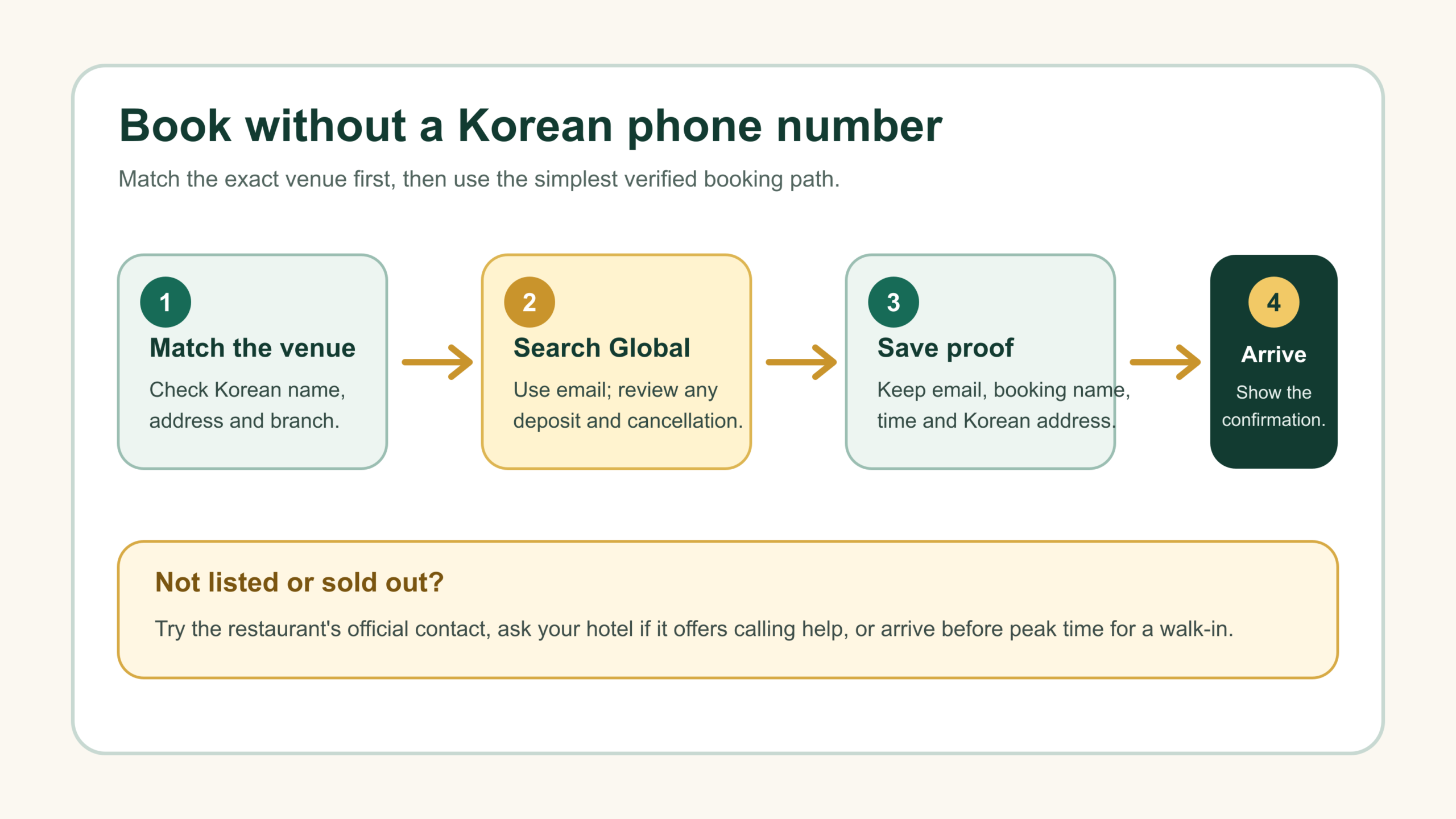
Step 1: identify the exact restaurant and branch
Do not book from an English name alone. Popular restaurants can have several branches with similar names, and a Seoul result may be far from the neighborhood in your itinerary.
- Find the restaurant in Naver Map or its official website.
- Copy the Korean restaurant name, street address and branch name.
- Compare those details with the reservation page.
- Save the Korean address so a taxi driver or hotel staff member can recognize it.
If English search fails, use the Naver Map address guide before paying a deposit. Matching the wrong branch is harder to fix than translating the correct one.
Step 2: book through CATCHTABLE Global
- Open the global website or global app and search the exact Korean or English name.
- Confirm the city, neighborhood, branch and map pin.
- Select the date, party size and available time.
- Enter an email address you can access while traveling.
- Review seating notes, menu requirements, deposit amount and cancellation deadline shown for that restaurant.
- If payment is required, use an international card enabled for overseas and online transactions.
- Save the confirmation email or page offline.
Do not assume every listing has the same rules. Some restaurants require a prepaid menu or deposit; others accept a reservation without payment. A card authorization, refund timing and no-show charge depend on the exact venue terms shown before confirmation.
If a foreign card fails, try a second issuer or network after checking that overseas and 3-D Secure approval is enabled. Do not repeat the same failed payment many times. The Korea cards and payment guide has a fuller failure sequence.
Step 3: save four pieces of proof
- reservation name exactly as entered;
- date, time and party size;
- restaurant’s Korean name and branch address;
- confirmation number, email or QR code supplied by the service.
Keep a screenshot available offline, but do not post a booking code or QR code publicly. If the confirmation changes, the live booking account or restaurant message takes priority over your old screenshot.
If the restaurant is not on CATCHTABLE Global
1. Check the restaurant’s own contact channels
Use the official website, email or social profile linked from the restaurant’s verified map listing. Send the date, time, party size, name and an email or overseas phone number. A message is only a request until the restaurant explicitly confirms it.
2. Ask your hotel whether it offers calling help
A hotel concierge or front desk may be able to call a restaurant for a registered guest, but this is a property service rather than a universal entitlement. Ask politely, provide the exact branch and accept that the hotel may decline deposits, guarantees or cancellation responsibility.
3. Use 1330 for tourism information and language help
The Korea Tourism Organization’s 1330 Travel Helpline provides multilingual tourism information and interpretation by call or text chat. It is useful for understanding a policy or communicating basic information, but do not assume it will act as your reservation or payment agent.
4. Plan a realistic walk-in
For restaurants that accept walk-ins, arrive before the main lunch or dinner rush, keep a backup nearby and ask for the expected wait before joining. A local waitlist may still ask for a Korean number, so remain close enough to see the queue display or ask staff how they will call you.
A traditional market needs a different fallback from a single restaurant. If the plan is Sunday street food, check the section-by-section schedule in the Gwangjang Market Sunday food-stall guide and treat any specific vendor as unconfirmed until it opens.
Useful Korean booking messages
| English | Korean to copy |
|---|---|
| I would like to make a reservation for two people on July 25 at 7 PM. | 7월 25일 오후 7시에 2명 예약하고 싶습니다. |
| I only have an overseas phone number. Can you confirm by email? | 외국 전화번호만 있습니다. 이메일로 확인 가능할까요? |
| The reservation name is Alex Kim. | 예약자 이름은 Alex Kim입니다. |
| Is a deposit required? | 예약금이 필요한가요? |
| I need to cancel the reservation. | 예약을 취소해야 합니다. |
| Can I join the waiting list without a Korean phone number? | 한국 전화번호가 없어도 웨이팅 등록이 가능한가요? |
| I only have an overseas number. How will you notify me? | 해외 전화번호만 있습니다. 입장 알림을 어떻게 받을 수 있을까요? |
| Can you register me on the on-site waiting list? | 현장 웨이팅으로 등록해 주실 수 있을까요? |
Replace the example date, time, party size and name. Machine translation can help with a simple request, but it does not create a confirmed reservation by itself.
If you would rather eat at your hotel or apartment, the Korea food delivery guide for foreigners explains coverage, address formatting, handoff instructions and foreign-card backups without assuming a Korean phone number.
Food allergies need a separate check
A reservation platform’s language support does not guarantee that a kitchen can prevent cross-contact. Korean stocks, sauces, marinades and side dishes can contain ingredients that are not obvious from the menu. Contact the restaurant before booking, carry a clear allergy card and choose a different venue if staff cannot confirm a safe process.
Practical rule: for a severe allergy, “no visible ingredient” is not enough. Ask about broth, sauce, cooking oil, shared grills and utensils, and follow your medical emergency plan.
On the day of the reservation
- Recheck the branch and travel time in a Korean map app.
- Arrive 5–10 minutes early unless the venue says otherwise.
- Show the booking name and confirmation rather than handing over an unlocked phone.
- Tell the restaurant promptly if you will be late.
- Keep the payment method required by the booking terms.
For everyday ordering, seat use and one-drink policies, read the Korea café etiquette guide. Restaurant policies can be stricter, so the venue’s reservation notice always wins.
Common mistakes
- Using the Korean domestic service by accident: switch to the global website or app.
- Booking the wrong branch: match the Korean address before paying.
- Entering a fake Korean number: staff may use it for confirmation or waiting-list calls.
- Ignoring the cancellation cutoff: read it before authorizing a deposit.
- Treating a sent message as confirmed: wait for an explicit reply.
- Relying on airport Wi-Fi for the confirmation: save it offline and set up connectivity with the Korea eSIM and SIM guide.
Frequently asked questions
Can foreigners use CATCHTABLE without a Korean phone number?
For supported CATCHTABLE Global listings, Korea Tourism Organization says travelers can use email and an international credit card without a Korean phone number or local payment method.
Does CATCHTABLE Global list every Korean restaurant?
No. Treat it as the first booking channel, not a complete national directory. Use the restaurant’s official contact, hotel assistance or a walk-in backup when a venue is absent.
Will 1330 make the booking for me?
1330 offers multilingual tourism information and interpretation. It may help you understand or communicate the request, but do not assume it will become the reservation or payment party.
Can I use an overseas number on a Korean waitlist?
It depends on that system. If the field requires a Korean mobile number, ask staff how they notify foreign visitors and remain nearby instead of entering a false number.
Can foreign tourists use Tabling?
Foreign users are not categorically excluded, but Tabling does not currently publish a CATCHTABLE Global-style promise for overseas phone numbers. Account, phone, notification and store settings can determine whether remote waiting works. Ask for an on-site option when the app cannot verify your real information.
Official sources
- Korea Tourism Organization: CATCHTABLE Global service profile, May 14, 2026
- CATCHTABLE Global official website
- Tabling: service, reservation and waiting terms, effective October 13, 2025
- Tabling: account and phone data policy
- VisitKorea: Helpful Apps & Resources, updated June 2026
- VisitKorea: 1330 Travel Helpline call and chat
Eating barbecue alone in Busan?
Check the minimum order, Korean questions and a verified option in the solo Korean BBQ in Busan guide.
Update history: first verified edition prepared July 21, 2026; CATCHTABLE Global and Tabling comparison added July 21, 2026. Platform coverage and restaurant rules can change at any time; the live restaurant booking page and confirmation control your reservation.