Short answer: T-Locker Seoul subway lockers cost KRW 2,200–4,400 for the first four hours on weekdays and KRW 3,100–6,100 on weekends or holidays. New lockers are reserved, paid for, opened and retrieved through the T-Locker app. Official hours are 05:00–24:00 every day, and you cannot store or retrieve a bag after midnight.

Foreigner warning: Apple lists Korean, English, Japanese and Simplified Chinese for the iPhone app, but Seoul’s current official facility page still labels T-Locker as Korean. Install and test the app before travel, keep a working data connection and carry another payment option. An overseas card is not guaranteed to pass every payment screen.
T-Locker Seoul prices, sizes and hours
| Size | Inside dimensions (W × D × H) | Weekday / 4h | Weekend or holiday / 4h | Extra hour |
|---|---|---|---|---|
| Small | 50 × 30 × 60 cm | KRW 2,200 | KRW 3,100 | KRW 500 |
| Medium | 50 × 45 × 60 cm | KRW 3,300 | KRW 4,600 | KRW 800 |
| Large | 50 × 90 × 60 cm | KRW 4,400 | KRW 6,100 | KRW 1,000 |
The dimensions matter more than a suitcase’s advertised inches. Measure a rigid case including wheels and handles. Do not force the door; choose a larger compartment if the bag prevents it closing completely.
Official access is 05:00–24:00 on weekdays, weekends and holidays. That is an access window, not a promise that a compartment will be free. Busy stations can fill before hotel check-in time, and a final subway arriving near midnight does not extend locker access.
The problem: the locker is easy, but the phone can fail
A traveler sees an empty door, downloads the app underground, then discovers weak data, a location-permission request, an unfamiliar payment page or the wrong locker bank. The official developer says the app uses location and beacon technology, shows availability in real time and supports reservations. Those features work best when location access, mobile data and the correct station are already set.
Do not make your first attempt five minutes before a train or flight. The app’s live instructions and reservation countdown control the transaction. Reserve only when you are close enough to reach the selected bank within the displayed time.
The twist: T-Locker and T-Luggage are different
| Service | How it works | Best choice when |
|---|---|---|
| T-Locker | Unstaffed, hourly, app-controlled; 05:00–24:00 | Your bag fits, the app and payment work, and you want the lowest short-stay price |
| T-Luggage | Staffed storage and delivery; 09:00–22:00; online reservation available | You have a large case, need human help or cannot complete the locker app |
| Older station locker | Controls and payment vary by machine | The posted English instructions clearly match the physical unit |
T-Luggage’s current four-hour storage rates start at KRW 3,000 on weekdays and KRW 4,000 on weekends for a bag up to 20 inches. It has staffed points at Seoul Station, Hongik Univ., Jamsil, Suseo, Myeong-dong, Gimpo International Airport and Jongno 3-ga. Treat it as the practical backup, not another name for the same locker.
How to reserve, pay and store a bag
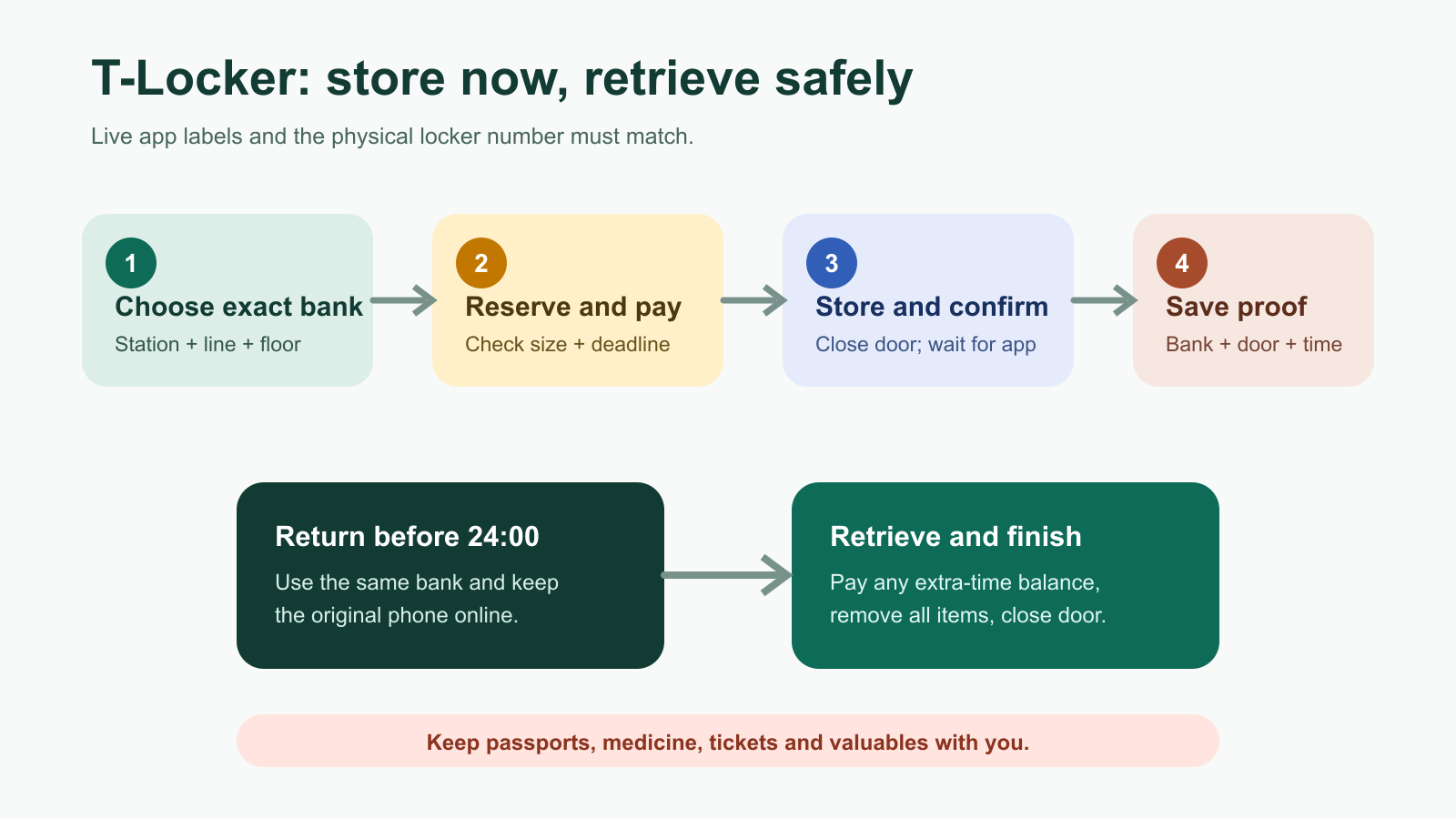
- Install the official app. Use the Seoul Metro operator links for Android or iPhone. The icon/name should read T-Locker or 또타라커.
- Allow the permissions needed for the live map. Turn on data, Bluetooth and location if the current app requests them. Do not depend on station Wi-Fi for a timed payment.
- Search the exact station and line. Transfer stations may have separate concourses and several locker banks. Compare the app’s floor, exit and locker-bank label with the signs around you.
- Check availability and choose a size. An available small door is useless if your suitcase is wider than 30 cm deep.
- Read the live price and deadline. Confirm weekday/weekend rate, selected station, compartment size and any reservation countdown before payment.
- Pay in the app. The official site lists credit card, bank transfer and mobile payment, but method eligibility can depend on account, device and card issuer. Keep a second card and enough time to use T-Luggage.
- Open only at the correct bank. Use the storage/open control shown for your booking. Match the displayed compartment number, put the bag inside, close the door firmly and wait for the app to confirm storage.
- Save proof. Screenshot the station, bank, locker number, booking screen and deadline. Photograph the nearby exit or shop landmark.
How to retrieve your luggage
- Return to the same bank well before 24:00 and keep the original phone online.
- Open the active booking and select the current retrieve/find option shown in the app.
- Pay any time-based balance if prompted. The extra fee accrues by size after the four-hour base period.
- Unlock the assigned door, remove everything, close it and confirm that the transaction is complete.
Do not uninstall the app, change accounts or let the phone battery die while a bag is stored. Keep passports, cash, medication, tickets and irreplaceable electronics with you. Official compensation for confirmed company-error damage is capped at KRW 100,000 under the terms, so a locker is not travel insurance.
How to find the locker inside a station
Google Maps can take you to a station entrance, but it usually cannot identify the correct underground locker bank. Use the T-Locker live map, then follow the station’s floor and exit-number signs. The Korean phrase 물품보관함 means “luggage locker.” Show this phrase and your screenshot at the station office if you are lost.
Before choosing a bank, check whether it is inside or outside the paid gate. Exiting to search for it can create an extra fare and a long detour. Our Seoul subway locker location guide gives floor and exit landmarks for Seoul Station, Myeongdong, Jamsil and other tourist stations. Use the Seoul subway map-app guide for exits and elevators.
If the app or door fails
- First confirm the station, line, bank and locker number; a nearby empty door may belong to another system.
- Keep screenshots of the error and payment rather than repeatedly buying new lockers.
- T-Locker lists +82-2-1877-1265 and +82-2-1670-4302, 06:00–24:00, with Korean-language support. On-site assistance may take up to two hours, and user-caused issues can carry a service fee.
- If time matters, go to a staffed T-Luggage point or another verified storage counter before its closing time.
Frequently asked questions
Can foreigners reserve T-Locker?
The service is public, but language, registration and payment compatibility can vary. Apple lists four app languages, while Seoul’s official page still labels the app Korean. Test the complete flow before relying on it.
Can I open a locker after midnight?
No. Seoul’s current guidance says storage and retrieval are unavailable outside 05:00–24:00.
Can a large suitcase fit?
A large T-Locker is listed as 50 × 90 × 60 cm inside. Measure the case including wheels and handles; availability is not guaranteed.
Official sources
- Seoul Metropolitan Government: T-Locker and T-Luggage prices, sizes, locations and hours
- T-Locker operator: map, availability, reservation and payment features
- Official T-Locker Android listing
- Official T-Locker iPhone listing
Last verified September 2, 2026. App screens, accepted payment methods, fees and locker availability can change. Follow the live screen and posted terms at the selected locker.